
 Euro Truck Simulator 2
 American
Truck Simulator
American
Truck Simulator
- Home
- Euro Truck Simulator 2
- Tools
- GMC Community MOD MANAGER for ETS2 and ATS
GMC Community MOD MANAGER for ETS2 and ATS
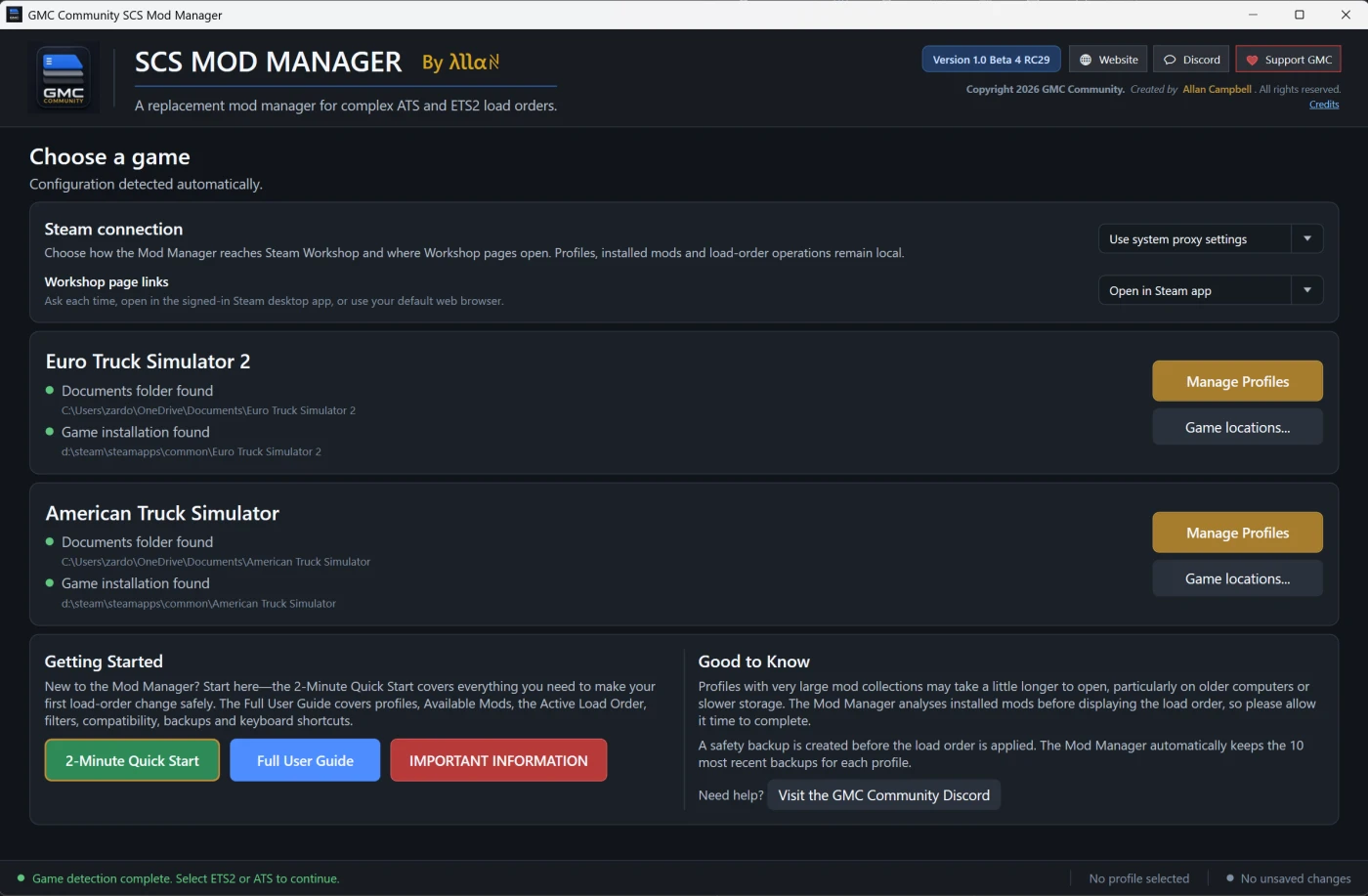
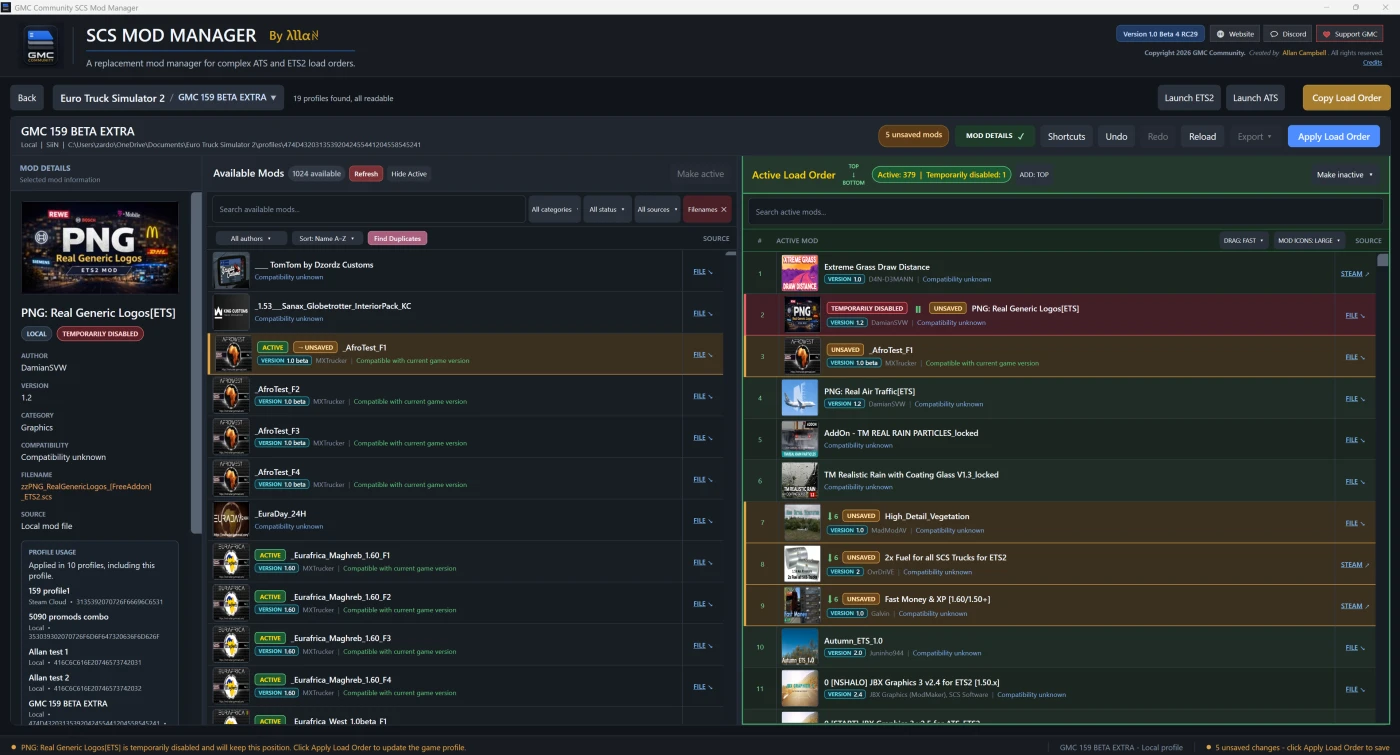
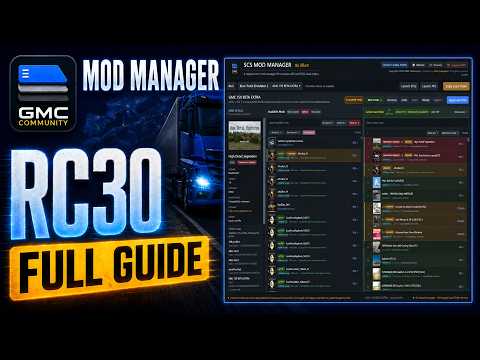
Take control of your ETS2 and ATS load orders
Built by the GMC Community for players running serious mod collections.
The GMC Community SCS Mod Manager brings your local and Steam Workshop mods together in one clear Windows application. Search your collection, inspect each mod and reorganise even very large load orders without fighting the standard in-game interface.
Why drivers use it
- One manager for ETS2 and ATS — select a game, choose a profile and start organising.
- Designed for large collections — drag mods through long load orders with Slow, Normal or Fast automatic scrolling.
- Find anything quickly — search, filter and sort by mod information, source and filename.
- See the useful details — names, authors, versions, compatibility, descriptions and artwork where available.
- Stay in control — temporarily disable mods, restore them, and use Undo or Redo while editing.
- Share your setup — copy or export complete load orders as TXT or CSV.
New in Version 1.1.3: faster profile loading
Version 1.1.3 replaces Version 1.1.2 and fixes the long first-profile delay that could repeat every time Mod Manager was restarted, particularly with large ETS2 or ATS mod collections.
- Unchanged local mod metadata is now remembered correctly between application launches.
- The lengthy HashFS metadata scan should no longer repeat every time Mod Manager starts.
- New, changed and removed mods are still detected normally.
- Genuine catalogue scans run away from the main window, keeping the application responsive.
- Clear loading feedback remains visible whenever new or changed content needs to be analysed.
- Damaged or obsolete cache data is ignored safely and rebuilt from the current files.
- Shared Load Order verification continues using fresh file evidence rather than relying on cached display information.
Important: The first load after updating, installing new mods or changing existing mod files may still require one scan. Later launches should reuse the saved metadata and load much faster.
Safer profile editing
Your profile is not changed while you experiment. The manager only writes the new load order when you select Apply Load Order. A backup is created before the change, the result is verified, and the previous profile can be restored if verification fails.
Useful shortcuts
- Open local mods directly in Windows File Explorer.
- Open the exact Steam Workshop page for Workshop mods.
- Choose Small, Large or Extra Large artwork—or turn artwork off.
- Launch ETS2 or ATS directly from the manager.
Requirements
- Windows 10 or Windows 11, 64-bit.
- Euro Truck Simulator 2 and/or American Truck Simulator.
- At least one readable local game profile.
The application is supplied as a self-contained Windows build, so a separate .NET installation is not normally required.
Official links
Website: https://www.gmc-modmanager.co.uk/
Discord and support: https://discord.gg/gmc-community
Join the GMC Community Discord for support, development updates, bug reports and discussion with other ETS2 and ATS players.
The GMC Community SCS Mod Manager is a free community project. It is not affiliated with SCS Software. Euro Truck Simulator 2 and American Truck Simulator are trademarks of SCS Software.
You are not allowed to upload this file to other sites under any circumstances.
You are not allowed to modify or improve my file under any circumstances.
You are not allowed to convert this file under any circumstances.
You are not allowed to use assets of my file under any circumstances.
2026-08-23
Version 1.1.18 — Menu and settings reliability update
Version 1.1.18 is a focused reliability update correcting a confirmed problem in Version 1.1.17.
Fixed
- Corrected an issue that could prevent certain popup-menu choices from being applied or remembered correctly.
- Steam connection and Workshop-page preferences now retain the selected choices reliably.
- Improved the reliability of Drag Scroll and MOD ICONS selections.
- Category, Compatibility and Source filters now safely ignore invalid or obsolete saved values without unexpectedly changing the current view.
- Shared Load Order verification reports now display their correct status names consistently.
Unchanged
- No features have been removed or redesigned.
- No UI layout changes have been made.
- Existing profiles, mods, load orders, backups and settings remain compatible.
- Version 1.1.17’s linked-mod-package support and previous safety corrections remain intact.
The reported problem was reproduced in Version 1.1.17, and the same operation was confirmed working correctly in Version 1.1.18.
Version 1.1.18 is recommended for all Version 1.1.17 users.
2026-08-23
GMC Community SCS Mod Manager — Version 1.1.17
Changes since public Version 1.1.4
Symbolic-link compatibility
- Added support when the selected ATS or ETS2
moddirectory is an absolute Windows directory symbolic link to a verified physical mod library on another drive or location. - Added support for individual top-level
.scsfiles and unpacked mod folders that are direct absolute symbolic links to packages in the other game’s mod library. - Supported linked packages are now correctly discovered and displayed in both Available Mods and Active Load Order.
- Active profile entries using linked packages no longer incorrectly appear as MISSING FILE.
- The selected game’s alias and filename remain the visible catalogue, profile and FILE identity.
- Metadata is safely read from the verified physical target without replacing the displayed identity with the other game’s path.
- Ordinary direct mod directories,
.scsfiles,.zipfiles and unpacked folders retain their existing behaviour.
Profile-writing reliability
- Improved Apply Load Order reliability for uncommon Steam Cloud configurations where Steam or Windows could reject or remove temporary transaction files created inside the Steam
remoteprofile tree. - Prepared replacements, displaced-original recovery data and rollback replacements are now staged in Mod Manager’s private managed location on the same Windows volume.
- If a safe transaction location cannot be established, Apply stops before altering the live
profile.sii. - Existing exact-byte verification, source-change detection, safety backups, conditional rollback, concurrent-writer protection and read-only attribute restoration remain active.
- This improves compatibility for the reported configuration, although final confirmation from that specific reporter remains pending.
Linked-package safety
- Both the symbolic-link object and its physical target are captured and revalidated before a linked package is accepted.
- Link replacement, target replacement, type changes, broken targets and chained links are rejected.
- Linked catalogue entries are deliberately read-only inside Mod Manager.
- Recycle rejects linked packages before considering their physical target, preventing an original ATS or ETS2 package from being moved or deleted accidentally.
- Junctions, relative links, dangling links, recursive or chained links, linked parent components and unsafe nested linked content remain unsupported and fail safely.
- One unsupported linked package will not prevent ordinary installed packages from being discovered.
Release protection and verification
- Added a permanent additional verification stage for Hardened releases.
- The finished protected executable is tested independently after transformation and again after signing.
- Hardened verification covers the real Available Mods interface, including Filename A–Z/Z–A sorting, labels, checkmarks and refresh persistence.
- Persistent metadata caches, JSON boundaries, matching, product provenance and native Windows operations are also checked using the final executable.
- No packer, executable compression, string encryption, anti-debugging, injection or self-modifying behaviour is used.
Installation
Close ATS/ETS2 and Mod Manager, remove or move older test copies, extract Version 1.1.17 into a new folder, and launch it normally. Administrator mode is not required.
2026-08-22
GMC COMMUNITY SCS MOD MANAGER — VERSION 1.1.4
Released: 22 August 2026
VERSION 1.1.4 HIGHLIGHTS
• Corrected an Available Mods sorting-menu issue affecting the Hardened release.
• Verified all six sorting choices: Display Name A–Z/Z–A, File Name A–Z/Z–A and Modified Newest/Oldest.
• Sorting now remains consistent through searches, filters and catalogue refreshes.
• Duplicate Finder now reliably restores the user’s previous sorting after its temporary duplicate grouping.
• Prevented sort-menu clicks from selecting a mod row underneath the menu.
RELIABILITY AND MAINTENANCE
• Reorganised selected main-window components internally to improve maintainability and future regression testing without changing the established profile, Apply, backup, rollback or Shared Load Order workflows.
• Corrected the in-app performance guidance to explain that unchanged display metadata is normally reused, while new or changed installed content is still discovered and read.
• Retains all Version 1.1.3 profile-loading responsiveness, persistent metadata-cache and Shared Load Order improvements.
RELEASE VERIFICATION
• Built using the GMC Hardened V3 protection profile.
• Digitally signed and trusted-timestamped by GMC Community LTD.
• Passed the complete 34-project release audit with 2,015 automated assertions.
• Passed protected runtime testing, normal launch verification and Microsoft Defender scans with zero new detections.
Installing this update does not automatically alter profiles, installed mods or load orders.
SUPPORTED GAMES
• Euro Truck Simulator 2
• American Truck Simulator
PUBLIC ZIP SHA-256
29CEB94842D54F4BFC5468233054883D7CBF4B4E6AA87A4116674B1D684A67E2
2026-08-22
GMC Community SCS Mod Manager — Version 1.1.3
STARTUP AND FIRST PROFILE LOADING FIX
Version 1.1.3 replaces Version 1.1.2 and corrects the long first-profile delay experienced by some users of the protected public build, especially with large ETS2 or ATS mod collections.
CHANGES
- Fixed unchanged HashFS mod metadata being read again every time Mod Manager was closed and restarted.
- Corrected the protected-build cache so installed-mod display metadata now persists reliably between application sessions.
- Unchanged
.scsand.zipmetadata is reused on later launches, substantially reducing repeat profile-loading time. - New, changed, removed or newly supported mod files are still detected from the live installed catalogue and reread when required.
- Moved the complete installed-mod catalogue scan away from the main window thread to keep the interface responsive during genuine cold or changed-library scans.
- Retained the visible LOADING PROFILE panel so users can see that the application is working whenever analysis is required.
- Existing compatible cache data remains supported. Damaged, stale or obsolete cache entries are ignored safely and rebuilt from current files.
- Shared Load Order review, export and final Apply continue using fresh file evidence; the performance cache is used only to accelerate ordinary catalogue display.
- Retains all Version 1.1.2 Shared Load Order, duplicate local archive, Recycle Bin filename, managed profile-backup, HashFS compatibility and safety corrections.
IMPORTANT
A new installation, the first load after updating, newly installed mods or changed mod files may still require one bounded metadata scan. Once unchanged metadata has been saved, later app starts should reuse it instead of repeating the previous long delay.
RELEASE VERIFICATION
- 34 executable regression projects passed.
- 1,957 of 1,957 automated checks passed.
- Strict release build completed with 0 warnings and 0 errors.
- Both protected release profiles passed their runtime protection and restart-cache tests.
- The final protected executables were tested against an 814-file ETS2 catalogue with zero pending HashFS rereads.
Updating to Version 1.1.3 is recommended for all Version 1.1.2 users, particularly anyone with a large local mod library.
2026-08-21
🚛 GMC Community SCS Mod Manager — Version 1.1.2
This is the first public update since Version 1.0.1, with major improvements to sharing load orders, mod compatibility, profile safety and general reliability.
✨ Shared Load Orders
• Export complete ETS2 or ATS load orders to a shareable .gmcorder file
• Import and review another player’s order before changing anything
• Automatically match installed Steam Workshop mods
• Clearly identify missing Workshop mods with links to their Steam pages
• Match local .scs and .zip mods using verified file information
• When the exact local version is missing, the manager can offer a safely identified installed version for your approval
• Recheck installed mods before loading or applying an imported order
• Nothing is written to your profile during the review stage
🛡️ Safer Profile Saving
• New automatic backups are stored in the Mod Manager’s managed backup library
• Existing backups created by older versions are left untouched
• Apply Load Order now verifies the original profile, backup and completed save
• Missing or changed backup evidence stops the operation before your profile is replaced
• Improved support for Local, Steam Cloud, OneDrive and read-only profiles
🔧 Mod and Interface Improvements
• Improved HashFS and large archive metadata reading
• Better mod names, authors, versions, descriptions and artwork
• Improved large and extra-large mod icons
• Better filtering, sorting and duplicate identification
• Safer local-mod Recycle Bin handling
• Clearer warnings, compatibility information and import-review wording
• Updated in-app guide and release documentation
✅ Release Assurance
Version 1.1.2 passed an expanded audit covering 34 test projects and 1,896 checks. Both release builds were also scanned locally with Microsoft Defender with no threats found.
Known limitation: unpacked mod folders can be used by the Mod Manager, but they are not currently included in Shared Load Order files.
Thank you to everyone who tested the development builds and reported problems. Your feedback directly helped make this release much safer and more reliable.
2026-08-19
🚛 GMC Community SCS Mod Manager — Version 1.0.1
🐛 Bug Fixes
- Fixed Steam Workshop mods being incorrectly marked as incompatible when their downloads contained packages for several game versions.
- Mod Manager now selects metadata from the package matching the installed ATS or ETS2 version.
- Prevented older retained manifests—such as a package for game version 1.59—from overriding a current package for version 1.60.
- Corrected the displayed mod name, package version, compatibility information and metadata source for affected Workshop mods.
- Fixed valid current Workshop mods being blocked from activation because compatibility information was taken from an older package.
- Added support for selecting current metadata from both loose Workshop package folders and
.scsor.zippackage archives.
✅ Example Fixed
Real Traffic Density ETS2 was incorrectly displayed as its older 1.59 release and marked incompatible with ETS2 1.60.1.7.
Version 1.0.1 now selects its current 1.60 package and allows the mod to be activated normally.
🛡️ Safety and Compatibility
- No profile or load-order files are automatically changed by this update.
- Existing Apply, backup, verification and rollback protections remain unchanged.
- Existing local mods and Steam Workshop subscriptions are not modified.
🧪 Release Validation
- ✅ 27 regression test programs passed.
- ✅ 809 maintained checks passed.
- ✅ No vulnerable or deprecated dependencies were detected.
📦 Version
GMC Community SCS Mod Manager 1.0.1
2026-08-19
V1.0 FINAL — FIRST PUBLIC RELEASE
GMC Community SCS Mod Manager V1.0 Final is our first complete public release for Euro Truck Simulator 2 and American Truck Simulator.
This release combines all development since Beta 4 RC30, with a major focus on safety, accurate mod identification, automatic updates and improved recovery tools.
VERSION INFORMATION
• Public version: V1.0 Final
• Internal file version: 1.0.4.74
• Supports ETS2 and ATS
MAIN CHANGES SINCE RC30
• GAME-RUNNING PROTECTION
Mod Manager can remain open while ETS2 or ATS is running. When the currently selected game starts, its workspace automatically becomes view-only.
Editing, applying load orders, recycling mods, restoring backups and transfer operations remain locked until the game closes. Any changes already staged in Mod Manager are preserved.
When the game closes, Mod Manager safely synchronises the installed mods, profiles and selected saved load order.
• AUTOMATIC MOD-FOLDER AWARENESS
Mod Manager now watches the selected game’s local mod folder and installed Steam Workshop folders.
Adding, removing, replacing or restoring a local mod normally updates Available Mods automatically. These updates are event-driven and combined into a controlled refresh, avoiding constant full rescans.
Only folders belonging to the currently selected game are watched.
• IMPROVED REFRESH BEHAVIOUR
The red Available Mods Refresh button updates the installed mod catalogue without deliberately reloading the selected profile or discarding staged changes.
The profile-selection panel has its own Refresh option for rereading Local and Steam Cloud profiles.
Reload still returns the workspace to its saved load order and warns before discarding unapplied changes.
• UNSAVED-CHANGE WARNING
Using Back, Reload, profile switching or closing with unapplied changes now produces a clear warning.
Keep Editing is the safe/default option.
• BACKUP & RESTORE
A dedicated Backup & Restore system has been added.
Users can create named per-profile load-order snapshots in a chosen folder. Restoring a snapshot stages the order for review and reports any missing mod content.
A restored order must still be saved through the normal protected Apply Load Order process.
• RECYCLE BIN SUPPORT
Eligible local .scs files, .zip files and supported unpacked mod folders can now be moved to the Windows Recycle Bin.
A clear warning is displayed first, with Cancel as the safe/default choice.
Mod Manager never uses permanent deletion as a fallback. Steam Workshop items, profiles, backups and files outside the configured mod folder cannot be recycled through this feature.
• DUPLICATE FINDER IMPROVEMENTS
Duplicate Finder remains conservative and read-only. Finding duplicates never changes files.
It considers filenames, metadata, component/version evidence, file size and selective SHA-256 checks while treating intentional BASE, DEF, MAP, ENG and similar component sets cautiously.
Recycling is a separate action with its own confirmation warning.
• SHOW MISSING
Missing active mods remain in their exact saved load-order positions and are never silently removed.
The new SHOW MISSING option makes missing references easy to locate, even in extremely large load orders.
• CORRECT .SCS AND .ZIP IDENTIFICATION
Same-name .scs and .zip packages remain separate entries, with their own versions, metadata, artwork and FILE targets.
Where an SCS profile stores a package name without an extension, Mod Manager now follows the game’s .scs precedence instead of incorrectly choosing the highest version number.
Genuine ambiguity remains clearly marked as MULTIPLE FILES and is never resolved through guesswork.
• PROFILE USAGE SYNCHRONISATION
Profile Usage information is refreshed from applied profile data after external changes made inside ETS2 or ATS.
The Mod Details panel should no longer retain stale usage information after the game closes and synchronisation completes.
• INDIVIDUAL MOD TRANSFERS
Individual load-order entries can be staged between compatible profiles.
Both profiles retain independent pending changes and review controls. Transfers copy load-order references only—they do not copy physical files or Steam subscriptions.
• SEARCH AND FILTER IMPROVEMENTS
Available Mods and Active Load Order now have independent searches.
Additional filtering, result counts, SHOW MISSING, exact FILE navigation and exact numeric STEAM links make large mod collections easier to manage.
• WORKSHOP DISPLAY NAMES
Unresolved installed Workshop items can be given a manual local display name.
This changes only the text displayed inside Mod Manager. It does not rename Steam files, change subscriptions, modify profiles or affect load orders. Workshop identity always remains tied to its numeric ID.
• EXPORT IMPROVEMENTS
Applied load orders can be exported using supported text and CSV formats.
Export remains read-only and is disabled while unapplied changes are present.
• FINAL RELEASE PRESENTATION
All Beta and RC branding has been replaced with the green Version 1.0 Final identity.
The Quick Start, Full User Guide, Important Information and staff support documentation have been updated for the final release.
SUPPORT
For help, questions or bug reports, please join the official GMC Community Discord:
https://discord.com/invite/gmc-community
When reporting a problem, please include the Mod Manager version, ETS2 or ATS game version, profile storage type, exact steps taken, complete error message and a cropped screenshot or short video where useful.
Please hide personal Windows usernames and private folder information before posting screenshots publicly.
Thank you to everyone who tested the release candidates and supplied feedback throughout development.
2026-08-16
🚛 GMC Community SCS Mod Manager — Beta 4 RC30
RC30 is now available, bringing a major improvement to profile management and several fixes since RC29.
✨ Transfer Individual Mods
A new two-profile workspace allows you to copy individual mods between profiles using drag and drop.
- View two profiles side by side
- Current profile is clearly shown in green
- Supports Local and Steam Cloud profiles
- Drag mods directly to the exact load-order position required
- Transfer multiple selected mods while preserving their order
- Mods are copied and never removed from the source profile
- Shared mods remain visible on both sides
- Duplicate and unavailable mods are safely skipped
- Remove selected mods from the staged secondary profile without deleting installed files
- Independent search, counts, undo and redo for each profile
- Apply changes to either profile individually or apply everything together
🛡️ Profile Safety
Profile changes continue to include:
- External-change detection
- Automatic timestamped backups
- Read-back verification after saving
- Rollback protection if a save fails
- Coordinated rollback when applying changes to multiple profiles
Installed mod files and Workshop subscriptions are never modified.
🔧 Interface Improvements
- Replaced transfer arrow buttons with drag and drop
- Fixed transfers stopping after copying more than two mods
- Prevented copied mods from visually appearing to move from their source
- Added clearer identification for mods shared between both profiles
- Fixed search results in the profile-transfer window
- Search results now display the proper mod name instead of the filename
- Corrected clipped and incorrectly rendered search text
- Improved drag scrolling through long load orders
- Temporary Disable is now shown in red
- Re-enable is shown in green
🔐 Protected Mod Metadata
Improved support for recognised protected AEM and GMC mod packages.
Protected mods can now display metadata from their readable manifest, including:
- Full mod name
- Author
- Version
- Compatible game versions
For example, vanemap.scs now correctly appears as Vanessa Pashmina Land instead of simply vanemap.
✅ Audit Results
- 515 regression assertions passed
- Strict release builds completed with 0 warnings and 0 errors
- All interface files successfully validated
- No vulnerable or deprecated packages detected
- Final protected release independently extracted and tested
- Version: 1.0 Beta 4 RC30
Thank you to everyone who tested RC29 and reported issues. Your feedback directly helped shape and improve RC30. 💙
2026-08-16
Initial public Trucky release — RC29
• Manage Euro Truck Simulator 2 and American Truck Simulator profiles.
• Organise large active load orders using drag-and-drop controls.
• View local and Steam Workshop mods together.
• Search, filter and sort installed mods.
• Display mod artwork, descriptions, authors, versions and compatibility information where available.
• Temporarily disable and restore mods, with Undo and Redo support.
• Export and copy load orders in TXT and CSV formats.
• Open local mod files, folders and Steam Workshop pages directly from the manager.
• Support for unpacked local mod folders, including folder-based artwork and descriptions.
• Automatic profile backup, verification and rollback protection when applying a load order.
This is the first public release distributed through TruckyMods.

You are not allowed to upload this file to other sites under any circumstances.
You are not allowed to modify or improve my file under any circumstances.
You are not allowed to convert this file under any circumstances.
You are not allowed to use assets of my file under any circumstances.
2026-08-23
Version 1.1.18 — Menu and settings reliability update
Version 1.1.18 is a focused reliability update correcting a confirmed problem in Version 1.1.17.
Fixed
- Corrected an issue that could prevent certain popup-menu choices from being applied or remembered correctly.
- Steam connection and Workshop-page preferences now retain the selected choices reliably.
- Improved the reliability of Drag Scroll and MOD ICONS selections.
- Category, Compatibility and Source filters now safely ignore invalid or obsolete saved values without unexpectedly changing the current view.
- Shared Load Order verification reports now display their correct status names consistently.
Unchanged
- No features have been removed or redesigned.
- No UI layout changes have been made.
- Existing profiles, mods, load orders, backups and settings remain compatible.
- Version 1.1.17’s linked-mod-package support and previous safety corrections remain intact.
The reported problem was reproduced in Version 1.1.17, and the same operation was confirmed working correctly in Version 1.1.18.
Version 1.1.18 is recommended for all Version 1.1.17 users.
2026-08-23
GMC Community SCS Mod Manager — Version 1.1.17
Changes since public Version 1.1.4
Symbolic-link compatibility
- Added support when the selected ATS or ETS2
moddirectory is an absolute Windows directory symbolic link to a verified physical mod library on another drive or location. - Added support for individual top-level
.scsfiles and unpacked mod folders that are direct absolute symbolic links to packages in the other game’s mod library. - Supported linked packages are now correctly discovered and displayed in both Available Mods and Active Load Order.
- Active profile entries using linked packages no longer incorrectly appear as MISSING FILE.
- The selected game’s alias and filename remain the visible catalogue, profile and FILE identity.
- Metadata is safely read from the verified physical target without replacing the displayed identity with the other game’s path.
- Ordinary direct mod directories,
.scsfiles,.zipfiles and unpacked folders retain their existing behaviour.
Profile-writing reliability
- Improved Apply Load Order reliability for uncommon Steam Cloud configurations where Steam or Windows could reject or remove temporary transaction files created inside the Steam
remoteprofile tree. - Prepared replacements, displaced-original recovery data and rollback replacements are now staged in Mod Manager’s private managed location on the same Windows volume.
- If a safe transaction location cannot be established, Apply stops before altering the live
profile.sii. - Existing exact-byte verification, source-change detection, safety backups, conditional rollback, concurrent-writer protection and read-only attribute restoration remain active.
- This improves compatibility for the reported configuration, although final confirmation from that specific reporter remains pending.
Linked-package safety
- Both the symbolic-link object and its physical target are captured and revalidated before a linked package is accepted.
- Link replacement, target replacement, type changes, broken targets and chained links are rejected.
- Linked catalogue entries are deliberately read-only inside Mod Manager.
- Recycle rejects linked packages before considering their physical target, preventing an original ATS or ETS2 package from being moved or deleted accidentally.
- Junctions, relative links, dangling links, recursive or chained links, linked parent components and unsafe nested linked content remain unsupported and fail safely.
- One unsupported linked package will not prevent ordinary installed packages from being discovered.
Release protection and verification
- Added a permanent additional verification stage for Hardened releases.
- The finished protected executable is tested independently after transformation and again after signing.
- Hardened verification covers the real Available Mods interface, including Filename A–Z/Z–A sorting, labels, checkmarks and refresh persistence.
- Persistent metadata caches, JSON boundaries, matching, product provenance and native Windows operations are also checked using the final executable.
- No packer, executable compression, string encryption, anti-debugging, injection or self-modifying behaviour is used.
Installation
Close ATS/ETS2 and Mod Manager, remove or move older test copies, extract Version 1.1.17 into a new folder, and launch it normally. Administrator mode is not required.
2026-08-22
GMC COMMUNITY SCS MOD MANAGER — VERSION 1.1.4
Released: 22 August 2026
VERSION 1.1.4 HIGHLIGHTS
• Corrected an Available Mods sorting-menu issue affecting the Hardened release.
• Verified all six sorting choices: Display Name A–Z/Z–A, File Name A–Z/Z–A and Modified Newest/Oldest.
• Sorting now remains consistent through searches, filters and catalogue refreshes.
• Duplicate Finder now reliably restores the user’s previous sorting after its temporary duplicate grouping.
• Prevented sort-menu clicks from selecting a mod row underneath the menu.
RELIABILITY AND MAINTENANCE
• Reorganised selected main-window components internally to improve maintainability and future regression testing without changing the established profile, Apply, backup, rollback or Shared Load Order workflows.
• Corrected the in-app performance guidance to explain that unchanged display metadata is normally reused, while new or changed installed content is still discovered and read.
• Retains all Version 1.1.3 profile-loading responsiveness, persistent metadata-cache and Shared Load Order improvements.
RELEASE VERIFICATION
• Built using the GMC Hardened V3 protection profile.
• Digitally signed and trusted-timestamped by GMC Community LTD.
• Passed the complete 34-project release audit with 2,015 automated assertions.
• Passed protected runtime testing, normal launch verification and Microsoft Defender scans with zero new detections.
Installing this update does not automatically alter profiles, installed mods or load orders.
SUPPORTED GAMES
• Euro Truck Simulator 2
• American Truck Simulator
PUBLIC ZIP SHA-256
29CEB94842D54F4BFC5468233054883D7CBF4B4E6AA87A4116674B1D684A67E2
2026-08-22
GMC Community SCS Mod Manager — Version 1.1.3
STARTUP AND FIRST PROFILE LOADING FIX
Version 1.1.3 replaces Version 1.1.2 and corrects the long first-profile delay experienced by some users of the protected public build, especially with large ETS2 or ATS mod collections.
CHANGES
- Fixed unchanged HashFS mod metadata being read again every time Mod Manager was closed and restarted.
- Corrected the protected-build cache so installed-mod display metadata now persists reliably between application sessions.
- Unchanged
.scsand.zipmetadata is reused on later launches, substantially reducing repeat profile-loading time. - New, changed, removed or newly supported mod files are still detected from the live installed catalogue and reread when required.
- Moved the complete installed-mod catalogue scan away from the main window thread to keep the interface responsive during genuine cold or changed-library scans.
- Retained the visible LOADING PROFILE panel so users can see that the application is working whenever analysis is required.
- Existing compatible cache data remains supported. Damaged, stale or obsolete cache entries are ignored safely and rebuilt from current files.
- Shared Load Order review, export and final Apply continue using fresh file evidence; the performance cache is used only to accelerate ordinary catalogue display.
- Retains all Version 1.1.2 Shared Load Order, duplicate local archive, Recycle Bin filename, managed profile-backup, HashFS compatibility and safety corrections.
IMPORTANT
A new installation, the first load after updating, newly installed mods or changed mod files may still require one bounded metadata scan. Once unchanged metadata has been saved, later app starts should reuse it instead of repeating the previous long delay.
RELEASE VERIFICATION
- 34 executable regression projects passed.
- 1,957 of 1,957 automated checks passed.
- Strict release build completed with 0 warnings and 0 errors.
- Both protected release profiles passed their runtime protection and restart-cache tests.
- The final protected executables were tested against an 814-file ETS2 catalogue with zero pending HashFS rereads.
Updating to Version 1.1.3 is recommended for all Version 1.1.2 users, particularly anyone with a large local mod library.
2026-08-21
🚛 GMC Community SCS Mod Manager — Version 1.1.2
This is the first public update since Version 1.0.1, with major improvements to sharing load orders, mod compatibility, profile safety and general reliability.
✨ Shared Load Orders
• Export complete ETS2 or ATS load orders to a shareable .gmcorder file
• Import and review another player’s order before changing anything
• Automatically match installed Steam Workshop mods
• Clearly identify missing Workshop mods with links to their Steam pages
• Match local .scs and .zip mods using verified file information
• When the exact local version is missing, the manager can offer a safely identified installed version for your approval
• Recheck installed mods before loading or applying an imported order
• Nothing is written to your profile during the review stage
🛡️ Safer Profile Saving
• New automatic backups are stored in the Mod Manager’s managed backup library
• Existing backups created by older versions are left untouched
• Apply Load Order now verifies the original profile, backup and completed save
• Missing or changed backup evidence stops the operation before your profile is replaced
• Improved support for Local, Steam Cloud, OneDrive and read-only profiles
🔧 Mod and Interface Improvements
• Improved HashFS and large archive metadata reading
• Better mod names, authors, versions, descriptions and artwork
• Improved large and extra-large mod icons
• Better filtering, sorting and duplicate identification
• Safer local-mod Recycle Bin handling
• Clearer warnings, compatibility information and import-review wording
• Updated in-app guide and release documentation
✅ Release Assurance
Version 1.1.2 passed an expanded audit covering 34 test projects and 1,896 checks. Both release builds were also scanned locally with Microsoft Defender with no threats found.
Known limitation: unpacked mod folders can be used by the Mod Manager, but they are not currently included in Shared Load Order files.
Thank you to everyone who tested the development builds and reported problems. Your feedback directly helped make this release much safer and more reliable.
2026-08-19
🚛 GMC Community SCS Mod Manager — Version 1.0.1
🐛 Bug Fixes
- Fixed Steam Workshop mods being incorrectly marked as incompatible when their downloads contained packages for several game versions.
- Mod Manager now selects metadata from the package matching the installed ATS or ETS2 version.
- Prevented older retained manifests—such as a package for game version 1.59—from overriding a current package for version 1.60.
- Corrected the displayed mod name, package version, compatibility information and metadata source for affected Workshop mods.
- Fixed valid current Workshop mods being blocked from activation because compatibility information was taken from an older package.
- Added support for selecting current metadata from both loose Workshop package folders and
.scsor.zippackage archives.
✅ Example Fixed
Real Traffic Density ETS2 was incorrectly displayed as its older 1.59 release and marked incompatible with ETS2 1.60.1.7.
Version 1.0.1 now selects its current 1.60 package and allows the mod to be activated normally.
🛡️ Safety and Compatibility
- No profile or load-order files are automatically changed by this update.
- Existing Apply, backup, verification and rollback protections remain unchanged.
- Existing local mods and Steam Workshop subscriptions are not modified.
🧪 Release Validation
- ✅ 27 regression test programs passed.
- ✅ 809 maintained checks passed.
- ✅ No vulnerable or deprecated dependencies were detected.
📦 Version
GMC Community SCS Mod Manager 1.0.1
2026-08-19
V1.0 FINAL — FIRST PUBLIC RELEASE
GMC Community SCS Mod Manager V1.0 Final is our first complete public release for Euro Truck Simulator 2 and American Truck Simulator.
This release combines all development since Beta 4 RC30, with a major focus on safety, accurate mod identification, automatic updates and improved recovery tools.
VERSION INFORMATION
• Public version: V1.0 Final
• Internal file version: 1.0.4.74
• Supports ETS2 and ATS
MAIN CHANGES SINCE RC30
• GAME-RUNNING PROTECTION
Mod Manager can remain open while ETS2 or ATS is running. When the currently selected game starts, its workspace automatically becomes view-only.
Editing, applying load orders, recycling mods, restoring backups and transfer operations remain locked until the game closes. Any changes already staged in Mod Manager are preserved.
When the game closes, Mod Manager safely synchronises the installed mods, profiles and selected saved load order.
• AUTOMATIC MOD-FOLDER AWARENESS
Mod Manager now watches the selected game’s local mod folder and installed Steam Workshop folders.
Adding, removing, replacing or restoring a local mod normally updates Available Mods automatically. These updates are event-driven and combined into a controlled refresh, avoiding constant full rescans.
Only folders belonging to the currently selected game are watched.
• IMPROVED REFRESH BEHAVIOUR
The red Available Mods Refresh button updates the installed mod catalogue without deliberately reloading the selected profile or discarding staged changes.
The profile-selection panel has its own Refresh option for rereading Local and Steam Cloud profiles.
Reload still returns the workspace to its saved load order and warns before discarding unapplied changes.
• UNSAVED-CHANGE WARNING
Using Back, Reload, profile switching or closing with unapplied changes now produces a clear warning.
Keep Editing is the safe/default option.
• BACKUP & RESTORE
A dedicated Backup & Restore system has been added.
Users can create named per-profile load-order snapshots in a chosen folder. Restoring a snapshot stages the order for review and reports any missing mod content.
A restored order must still be saved through the normal protected Apply Load Order process.
• RECYCLE BIN SUPPORT
Eligible local .scs files, .zip files and supported unpacked mod folders can now be moved to the Windows Recycle Bin.
A clear warning is displayed first, with Cancel as the safe/default choice.
Mod Manager never uses permanent deletion as a fallback. Steam Workshop items, profiles, backups and files outside the configured mod folder cannot be recycled through this feature.
• DUPLICATE FINDER IMPROVEMENTS
Duplicate Finder remains conservative and read-only. Finding duplicates never changes files.
It considers filenames, metadata, component/version evidence, file size and selective SHA-256 checks while treating intentional BASE, DEF, MAP, ENG and similar component sets cautiously.
Recycling is a separate action with its own confirmation warning.
• SHOW MISSING
Missing active mods remain in their exact saved load-order positions and are never silently removed.
The new SHOW MISSING option makes missing references easy to locate, even in extremely large load orders.
• CORRECT .SCS AND .ZIP IDENTIFICATION
Same-name .scs and .zip packages remain separate entries, with their own versions, metadata, artwork and FILE targets.
Where an SCS profile stores a package name without an extension, Mod Manager now follows the game’s .scs precedence instead of incorrectly choosing the highest version number.
Genuine ambiguity remains clearly marked as MULTIPLE FILES and is never resolved through guesswork.
• PROFILE USAGE SYNCHRONISATION
Profile Usage information is refreshed from applied profile data after external changes made inside ETS2 or ATS.
The Mod Details panel should no longer retain stale usage information after the game closes and synchronisation completes.
• INDIVIDUAL MOD TRANSFERS
Individual load-order entries can be staged between compatible profiles.
Both profiles retain independent pending changes and review controls. Transfers copy load-order references only—they do not copy physical files or Steam subscriptions.
• SEARCH AND FILTER IMPROVEMENTS
Available Mods and Active Load Order now have independent searches.
Additional filtering, result counts, SHOW MISSING, exact FILE navigation and exact numeric STEAM links make large mod collections easier to manage.
• WORKSHOP DISPLAY NAMES
Unresolved installed Workshop items can be given a manual local display name.
This changes only the text displayed inside Mod Manager. It does not rename Steam files, change subscriptions, modify profiles or affect load orders. Workshop identity always remains tied to its numeric ID.
• EXPORT IMPROVEMENTS
Applied load orders can be exported using supported text and CSV formats.
Export remains read-only and is disabled while unapplied changes are present.
• FINAL RELEASE PRESENTATION
All Beta and RC branding has been replaced with the green Version 1.0 Final identity.
The Quick Start, Full User Guide, Important Information and staff support documentation have been updated for the final release.
SUPPORT
For help, questions or bug reports, please join the official GMC Community Discord:
https://discord.com/invite/gmc-community
When reporting a problem, please include the Mod Manager version, ETS2 or ATS game version, profile storage type, exact steps taken, complete error message and a cropped screenshot or short video where useful.
Please hide personal Windows usernames and private folder information before posting screenshots publicly.
Thank you to everyone who tested the release candidates and supplied feedback throughout development.
2026-08-16
🚛 GMC Community SCS Mod Manager — Beta 4 RC30
RC30 is now available, bringing a major improvement to profile management and several fixes since RC29.
✨ Transfer Individual Mods
A new two-profile workspace allows you to copy individual mods between profiles using drag and drop.
- View two profiles side by side
- Current profile is clearly shown in green
- Supports Local and Steam Cloud profiles
- Drag mods directly to the exact load-order position required
- Transfer multiple selected mods while preserving their order
- Mods are copied and never removed from the source profile
- Shared mods remain visible on both sides
- Duplicate and unavailable mods are safely skipped
- Remove selected mods from the staged secondary profile without deleting installed files
- Independent search, counts, undo and redo for each profile
- Apply changes to either profile individually or apply everything together
🛡️ Profile Safety
Profile changes continue to include:
- External-change detection
- Automatic timestamped backups
- Read-back verification after saving
- Rollback protection if a save fails
- Coordinated rollback when applying changes to multiple profiles
Installed mod files and Workshop subscriptions are never modified.
🔧 Interface Improvements
- Replaced transfer arrow buttons with drag and drop
- Fixed transfers stopping after copying more than two mods
- Prevented copied mods from visually appearing to move from their source
- Added clearer identification for mods shared between both profiles
- Fixed search results in the profile-transfer window
- Search results now display the proper mod name instead of the filename
- Corrected clipped and incorrectly rendered search text
- Improved drag scrolling through long load orders
- Temporary Disable is now shown in red
- Re-enable is shown in green
🔐 Protected Mod Metadata
Improved support for recognised protected AEM and GMC mod packages.
Protected mods can now display metadata from their readable manifest, including:
- Full mod name
- Author
- Version
- Compatible game versions
For example, vanemap.scs now correctly appears as Vanessa Pashmina Land instead of simply vanemap.
✅ Audit Results
- 515 regression assertions passed
- Strict release builds completed with 0 warnings and 0 errors
- All interface files successfully validated
- No vulnerable or deprecated packages detected
- Final protected release independently extracted and tested
- Version: 1.0 Beta 4 RC30
Thank you to everyone who tested RC29 and reported issues. Your feedback directly helped shape and improve RC30. 💙
2026-08-16
Initial public Trucky release — RC29
• Manage Euro Truck Simulator 2 and American Truck Simulator profiles.
• Organise large active load orders using drag-and-drop controls.
• View local and Steam Workshop mods together.
• Search, filter and sort installed mods.
• Display mod artwork, descriptions, authors, versions and compatibility information where available.
• Temporarily disable and restore mods, with Undo and Redo support.
• Export and copy load orders in TXT and CSV formats.
• Open local mod files, folders and Steam Workshop pages directly from the manager.
• Support for unpacked local mod folders, including folder-based artwork and descriptions.
• Automatic profile backup, verification and rollback protection when applying a load order.
This is the first public release distributed through TruckyMods.

Other Mods for Euro Truck Simulator 2

![[1.52]Beyond Fix](https://storage.truckymods.io/public/projects/beyond-country-registration-separator/media/578ca5307fb2f51a321fc7fad4a9d6f9.webp)

![[DISC.] UKS&OI Ferry Fix](https://storage.truckymods.io/projects/uksoi-ferry-fix-720872/media/5335090a2ae1c6302d85f0bb52678736.webp)
This Euro Truck Simulator 2 add-on was created by Allan-GMC and shared in Tools for Euro Truck Simulator 2.